Download page

7-day trial, no credit card required

This is the entry point for the trial. VoxBridge Studio is delivered as a portable ZIP package: download it, unzip it, and start the 7-day trial. If the workflow fits, you can move to the fixed-price personal license afterward. The trial includes 120 subtitle minutes, up to 15 videos, with a maximum of 60 minutes per video.

Quick start in 3 steps
1. Download 2. Install 3. FFmpeg + Ollama
  1. Download the portable ZIP package.
  2. Extract it into a separate folder, then start the app.
  3. Check FFmpeg, Ollama and the downloaded model.

Recommended flow: download → setup → short test video → if it works, move to the personal license.

Minimum commands

If you want to verify the environment quickly

You can run these in PowerShell or cmd. If they work, most of the setup path is already in a good place.

ffmpeg -version
ollama --version
ollama list
ollama pull translategemma:12b
ollama pull translategemma:27b

What do they mean?

  • ffmpeg -version: checks whether FFmpeg is visible to the system
  • ollama --version: checks whether Ollama is installed
  • ollama list: checks whether Ollama responds and whether a model exists
  • translategemma:12b: easier first start
  • translategemma:27b: usually better translation quality with higher hardware demand

The full detailed path is in the setup guide, including separate PowerShell and cmd examples.

Download package

VoxBridge Studio alpha-0.0.1 portable ZIP

The portable ZIP does not need a traditional installer. Extract it into a separate folder, start the app, then follow the first-run checks.

Recommended

Portable ZIP

File: VoxBridgeStudio-portable-alpha-0.0.1.zip

Size: approx. 137 MB

SHA-256: d293d7a44379516b1b6347034f1ad9d9babe7ab0ac2c67a346346a95e3756caf

Download portable ZIP Release notes
Before download

What should you check?

  • File: VoxBridgeStudio-portable-alpha-0.0.1.zip
  • Size: approx. 137 MB
  • Checksum: verify the downloaded package with the SHA-256 value
  • Setup: FFmpeg, Ollama and a translation model are required
  • First test: start with a short, non-private video
Usage path

What should you do after download?

Extract the ZIP into a separate folder, start VoxBridge Studio, then run the first-run checks. The trial is there to confirm that subtitle creation and translation work on your own machine.

First success in 15 minutes

Start with a short, safe test

Do not start with a long, important course video. The first goal is simply to confirm that the subtitle and translation workflow works on your machine.

  1. Extract the portable ZIP into a separate folder.
  2. Start the VoxBridge Studio app.
  3. Check FFmpeg, Ollama and model status.
  4. Choose a 1-3 minute non-private test video or an existing sidecar subtitle.
  5. Create a language-coded SRT subtitle, for example VideoName.hu.srt.

Try dubbing only after this. A stable subtitle workflow is the foundation.

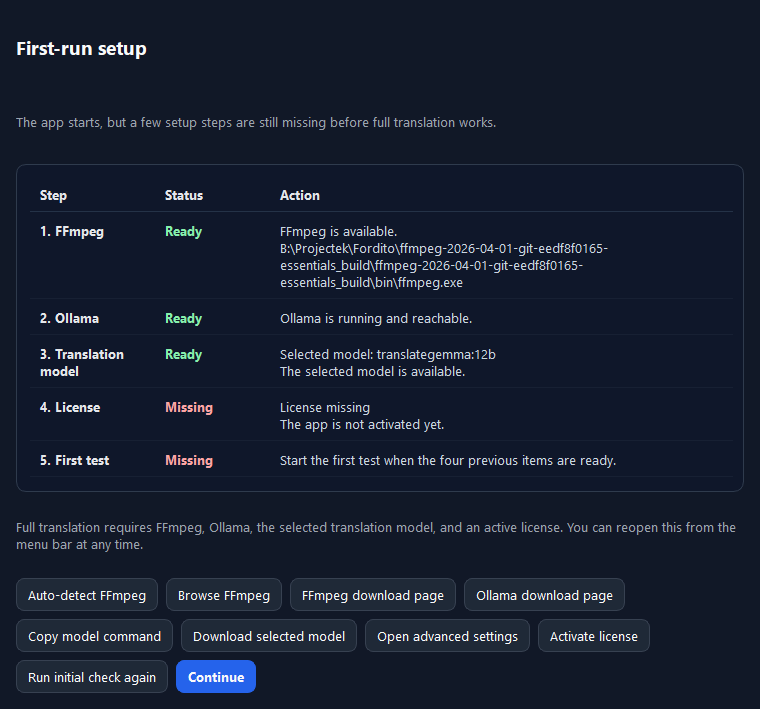
VoxBridge Studio setup assistant for first success
First-run checks The setup assistant walks through FFmpeg, Ollama, model, license and first-test readiness.
Download package

What is inside the portable ZIP?

  • VoxBridge Studio Windows app in portable form
  • trial and license activation screen
  • subtitle, translation and export workflow
  • support export for troubleshooting
  • SHA-256 checksums for verification

Always start the program from the extracted folder, not from inside the ZIP file.

Version

What does the v2.0.0 package support?

  • multi-video processing queue
  • existing subtitle translation or subtitle creation from audio
  • multiple source and target languages in the subtitle workflow
  • language-tagged SRT export
  • optional experimental Hungarian voice feature

For better translation quality, a stronger machine and a larger model are recommended.

Trial

What happens after 7 days?

  • the trial includes 120 minutes of subtitle creation or translation
  • up to 15 videos can be processed, with a 60-minute maximum per video
  • subtitle burn-in can be tested for up to 3 trial exports
  • experimental Hungarian voice can be tested for up to 10 minutes
  • the trial helps you verify the workflow on your own machine before purchase
  • if the workflow works, move to the fixed-price personal license
  • the license is for 1 active machine
  • if not, use support export for troubleshooting
  • if it is not a fit, no further obligation

There is no need to compare multiple launch tiers. The path is built around one clear purchase decision.

System requirements

MinimumRecommended
Windows 10 or newer
FFmpeg installed or in PATH
running Ollama service
at least one downloaded model
16 GB RAM recommended for the 12b model
valid license
32 GB RAM or more for the 27b model
fast SSD
GPU support if available
stable internet for model downloads

First-run minimum

  • FFmpeg available
  • Ollama available
  • at least one model installed
  • 12b can run on lighter setups, while 27b benefits from a stronger machine
  • setup assistant checked
  • workflow profile selected
  • run a test job
Important This page is the entry path for the 7-day no-credit-card trial. The trial includes 120 subtitle minutes, up to 15 videos and a short Hungarian voice test allowance. The paid license is a fixed-price personal license for 1 active machine.